Clear at a glance
What Clear does, how it differs from Team Inbox, how to turn it on — and what happens to your mail.
A shared inbox shows mail. But the actual work is about matters: a complaint, an enquiry, a question about an invoice. A single matter often spans two or three mails, a call note, a commitment and eventually your own reply. Astreo Clear reads incoming mail alongside you and turns it into cases — sorted by what a person needs to do next.
If you are setting up Clear for the first time, there is an illustrated step-by-step guide at Clear: getting started. This chapter explains the ideas behind it.
What Clear does
For every incoming mail, Clear works out what it is about, what is expected (a reply, an action
or just acknowledgement), by when, what the tone is and who is writing. Mails that belong to the
same matter are bundled into one case with a reference number, for example
2026-0912.
- Sorting. Every case sits on one of four stacks: Decide, Release, Watch, Done. The stack tells you what to do — more on this under Today & the four stacks.
- Preparing. Where a reply is needed, Clear writes a draft. Every sentence names its source: the mail, the call note, one of your house rules. Whatever Clear cannot back up is left open as a gap.
- Suggesting what to sort out. Clear keeps advertising, newsletters and system notifications off the stacks. Where it is unsure, it asks under “suggestions to hide”.
- Suggesting ownership. Clear suggests who should take a case and says why. See Commitments, ownership & cover.
Clear never sends. Every mail that leaves your company has been read and sent by a person. As long as the draft contains a gap, “Send” stays locked — in the browser and on the server as well. By default, Clear works in suggest mode: it suggests and prepares, and the decision is made in the “Decide” box. How much Clear may do on its own is described under Suggest or operate.
Clear and Team Inbox
Clear is offered as an alternative to Team Inbox. Both work on the same shared mailboxes, with the same teams and permissions. The difference is who organises the mail:
- Team Inbox — you organise it yourselves. Above each mail you see the state (Open, Waiting, Done), the assignment and the internal chat line with “Tasks” and “History”. Work happens in the mail view and the views.
- With Clear — you also get the “Today” page, which becomes your start page. Above the mail, the state line is replaced by the case box with key facts, draft and “Decide”. In the team settings, fallback person, cover and “Rules and knowledge” appear.
Without Clear there is no Today page, no case box and no rules — not through the API either: the server then rejects Clear requests.
Turning on Clear
When signing up
New companies start with Clear. Sign-up includes a required checkbox for this: an AI reads the inbox of your connected mailboxes, going back 90 days, sorts it into cases and prepares replies. Clear is switched on once you confirm your email address, and your consent is recorded in the log. If you sign up with Google or Microsoft, you start without Clear and can turn it on as described below.
During the trial
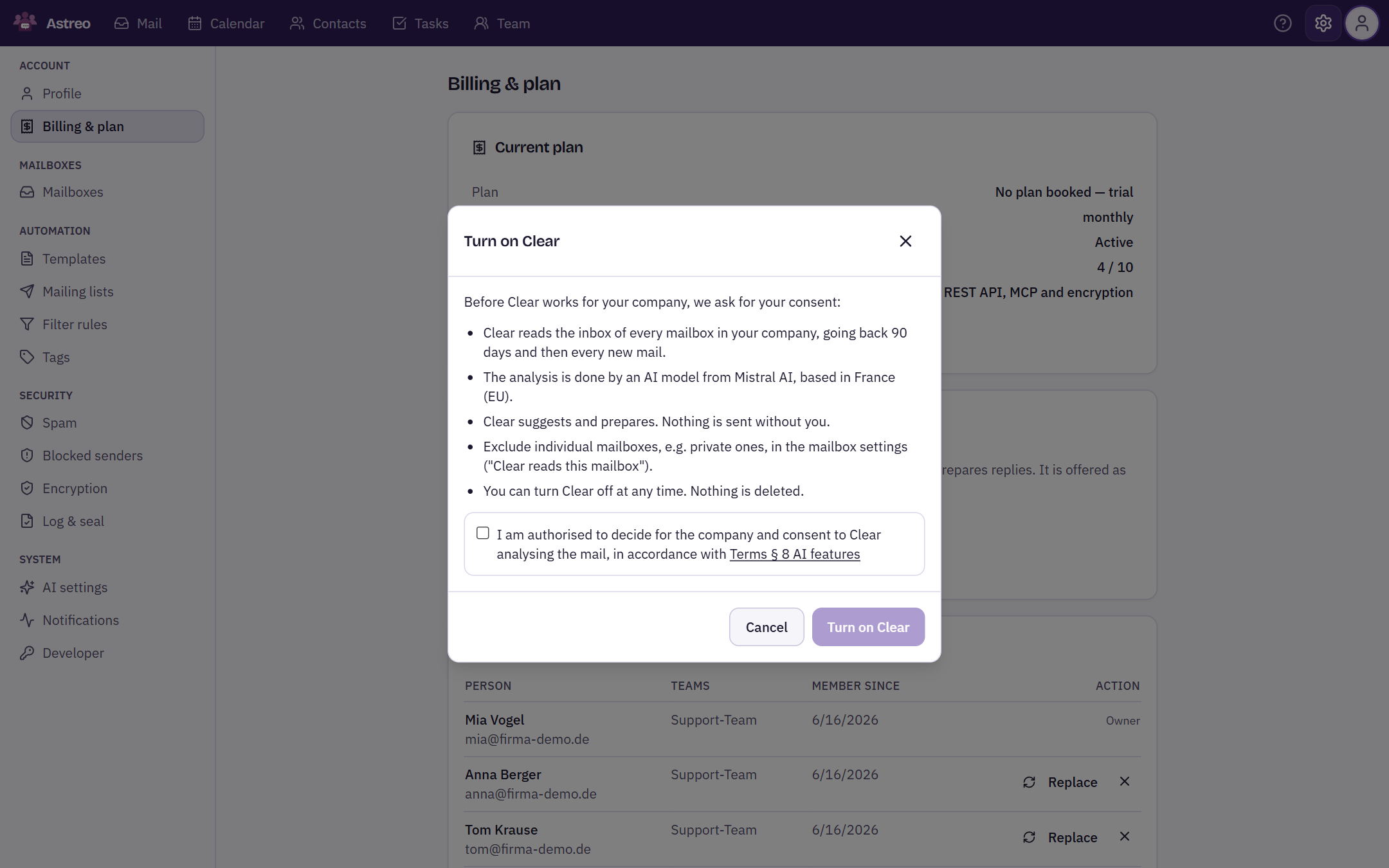
Under Settings → Billing & plan you will find the “Astreo Clear” card with the current status. During the trial, your company switches it on or off there itself; this applies until the trial ends. Only owners and admins can switch — the setting affects all of the company's mailboxes, not a single person.
Before switching on, Astreo explicitly asks for your consent and explains what will happen. “Turn on Clear” only becomes available once you tick the box. Clear then processes all mailboxes right away and opens the Today page.
Suggest or operate
How much Clear does on its own is chosen by owners and admins under Settings → Billing & plan, in the “Astreo Clear” card under “How much Clear does on its own”:
- “Suggest” (default) — Clear suggests, people decide: sorting out, commitments and ownership wait for confirmation.
- “Operate” — Clear acts on its own: hides advertising and the like, confirms detected commitments and assigns cases once the objection period has passed, where the team allows it. Everything stays in the log and can be undone.
The choice appears once Clear is turned on. The mode cannot be changed during a look-back. Every change is recorded in the log. Even in operate mode, nothing is sent without a person.
With a paid plan
Paying customers switch to Clear through their plan. As long as the Clear plan cannot be booked yet, the card says so; in that case, please get in touch. More about plans under Company, access & billing.
What happens to your mail
- Who processes it. The AI behind Clear is operated by Mistral AI, based in Paris; processing takes place in the European Union and is covered by the data processing agreement.
- What is read. The inbox of your company's mailboxes — going back 90 days when you switch on, and every new mail after that.
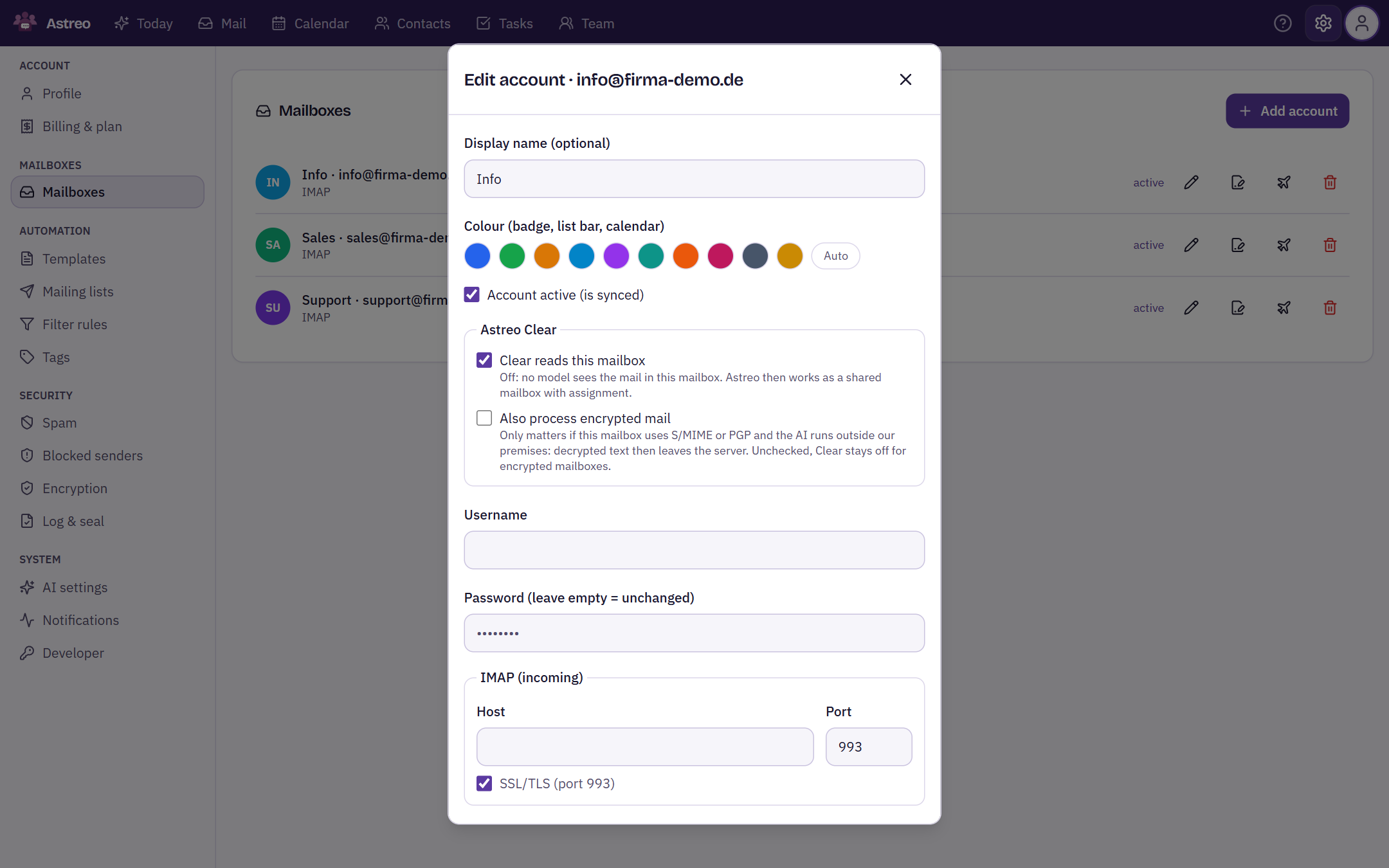
- Excluding mailboxes. Under Settings → Mailboxes → Edit account you will find the “Clear reads this mailbox” switch. When it is off, no model sees the mail in that mailbox; it then works as a shared mailbox with assignment. This is a good idea for private mailboxes, for example.
- Encrypted mail. If a mailbox uses S/MIME or PGP, Clear stays off for it until you allow “Also process encrypted mail” in the same dialog. Decrypted text then leaves the server.
Turning off Clear
While Clear is on, “Billing & plan” shows “Turn off Clear”. This deletes nothing: cases, drafts and the log are kept and come back when you turn Clear on again. Until then Astreo works like Team Inbox, with state, assignment and chat above the mail.
Traceable
Every step the engine takes — read, analysed, bundled, draft written, sorted out, brought back — is recorded with a timestamp in the log, as is every decision made by a person and every time Clear is switched on or off. Open it from a case via “View in the register” or under Settings → Log & seal. More under Rules & traceability.