Rules & traceability
Give Clear house rules, try them out safely — and read up on every step the engine took.
Every company has things that are “just how we do it”: late cancellations cost a flat fee, mail from a particular key account always goes to the same colleague, applications don't belong on the stacks. You give Clear house rules like these as Rules and knowledge. And because an engine that reads along only deserves trust if you can check up on it, every one of its steps is recorded in the log.
Rules and knowledge
A rule consists of if and then — for example “If an appointment is cancelled less than 24 hours ahead, then charge the call-out fee”. Every rule has a number (R-001, R-002 …). There are three kinds you create yourself:
- Replies — go into the draft. Clear words its reply accordingly and cites the rule there as evidence. Such a rule can additionally specify that mail like this isn't shown at all (see Hiding).
- Knowledge — facts about your company, which also go into drafts as evidence. A knowledge rule can carry a reply deadline in business days: if an email names no deadline itself, Clear derives it from this. Saturday and Sunday don't count.
- Responsibility — who gets a particular kind of mail. A responsibility rule needs a person to assign to and a machine-readable condition. It works without the model, as a filter per mailbox: it assigns, but it doesn't move anything, delete anything or mark anything as read.
There are also protection rules. They are built into the software and nobody can change or turn them off — for example that Clear only reads and never sends, moves or deletes an email, that every fact in a draft carries evidence or is a gap, and that instructions written in an email are treated as content, never as instructions to Clear.
A rule from a sentence
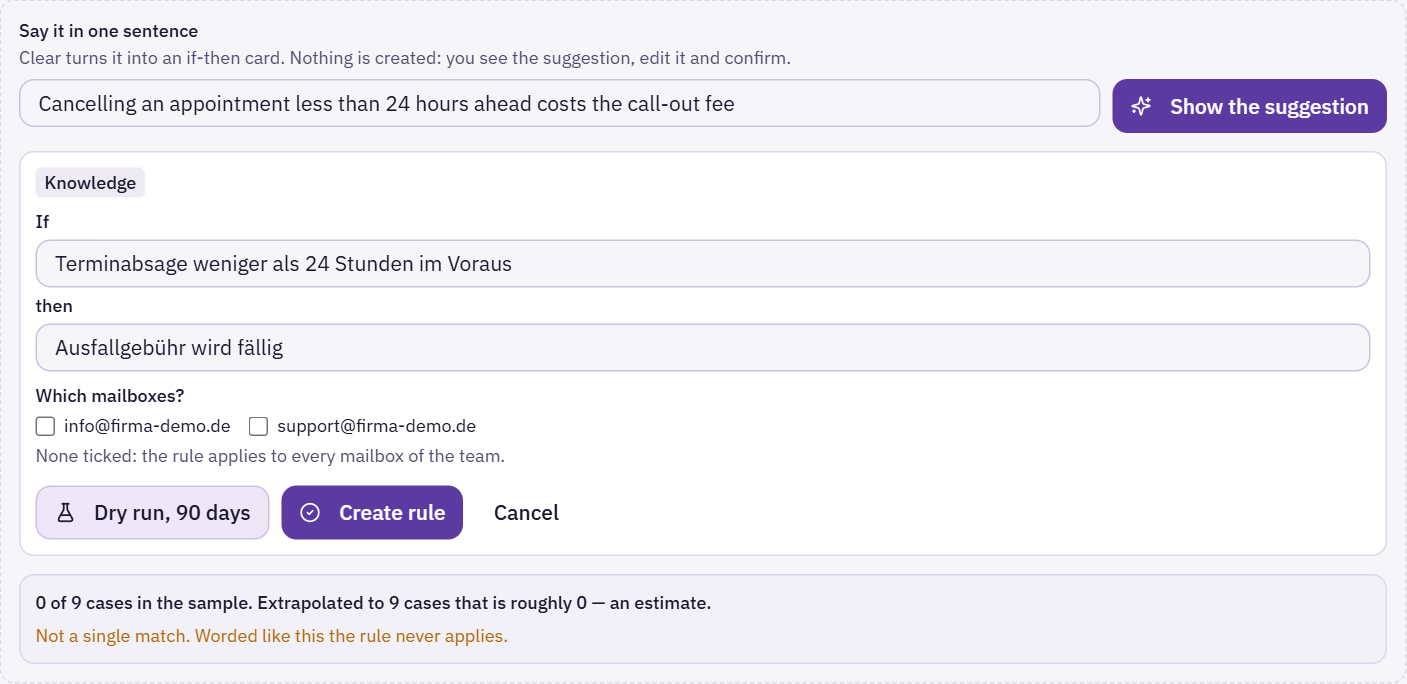
The quickest way to a rule is “From a sentence”. Write the sentence the way you would tell a new colleague and click “Show the suggestion”. Clear turns it into an if-then card — nothing is created at this point. You see the suggestion, change it and confirm with “Create rule”. If Clear was unsure, it asks a follow-up question; you can answer it or take the card as it is.
Alternatively, create a rule directly with “Add rule”, choosing the kind, the if and the then. A new rule with the same condition as an existing one but a different effect is not created: two rules that contradict each other have to be resolved by a person.
For which mailboxes?
Every rule can be limited to individual mailboxes. If none is ticked, it applies to all mailboxes. When you change a rule, a new version is created; the old one stays readable, because the previous applications are linked to it. After a change, Clear reassesses open cases within the rule's scope — completed and hidden ones are left alone.
Dry run: try it first
Before a rule takes effect, the “Dry run, 90 days” shows what it would have done over the last 90 days:
- Responsibility rules are counted against existing mail — with the same check the filter uses later.
- Reply and knowledge rules are checked by Clear on a sample of cases spread evenly across the period and then extrapolated. That is an estimate, and it is labelled as one.
If a rule has not a single match, the dry run says “Not a single match. Worded like this the rule never applies.” — usually a sign that the sentence is too narrow. It also shows how many open cases the rule would affect.
Hiding: don't show mail like this at all
A reply rule can carry the effect “Don't show mail like this at all”. Clear then checks for every email it analyses whether the condition applies — including where no filter can help, such as “unsolicited job application”. If it applies, the case disappears from the stacks and no draft is written.
The email stays in your mailbox. Clear doesn't move or delete anything. Every hide is recorded in the log and can be undone. If someone brings a hidden case back, it counts as a correction for the rule.
Keeping an eye on rules
The list shows for each rule how often it applied in the last 30 days and how often a person corrected the result. Two hints help with tidying up: “Corrected often. The wording probably does not fit.” and “No match in 30 days. Does the rule apply at all?”. A rule can be edited, turned off and turned back on; “Include disabled” also shows the ones that are turned off.
The “Rules and knowledge” section is in the team area and visible to all team members once Clear is turned on. Any member of the company may create a rule — also straight from a case. A rule can be changed, turned off and deleted by whoever created it and by the company's owners and admins; for everyone else, the buttons for that are missing on the rule. Protection rules cannot be changed by anyone.
Suggestions from Clear
Once a day, Clear looks through the last 90 days for patterns that people have handled the same way again and again, and offers rules based on them — under “Clear noticed something”. An accepted suggestion applies to the whole company, so only owners and admins see and decide on these suggestions:
- Mail from the same sender domain is always assigned to the same person → a responsibility rule.
- Mail from the same sender that Clear hides is brought back again and again → “never hide”.
A pattern only counts from five cases onwards and if at least 80 percent of them ended the same way. Each suggestion states the number of cases and exceptions. A suggestion does nothing until you click “Take it”; “No thanks” rejects it, and it doesn't come back.
Turn this into a rule
Most rules come from a specific case. In the case card, “Turn this into a rule” takes you straight to “From a sentence” — with this case as the starting point.
Traceability: the log
Everything Clear does is recorded in the register — with time, type and what it concerns. The register can only be added to, never changed; a running number shows if an entry is missing. Typical entries from Clear:
- “Clear read the mail” and “Clear analysed the mail”
- “Clear wrote a draft”
- “Clear hid it” and “Brought back”
- “Clear spotted a commitment” and “Clear suggested an owner”
- “Clear bundled the case”
- “Rule created”, “Rule changed”, “Rule applied”, “Rule corrected”
- “Clear turned on or off”
Human actions sit alongside: assigned, completed, moved, deleted, note written. You see what happened in a team you belong to.
Where to find it
- In the case card, “View in the register” shows all entries for exactly this case. “Show all entries” removes the restriction.
- The whole register is under Settings → Log & seal, filterable by period and type. How the seal secures the chain externally is described in Settings & security.
- In a case's History, the engine's steps are hidden by default. Untick “Hide system messages” and they appear between emails and notes; your choice is remembered.
Permissions in the team
What someone may do with a case is governed by six action permissions per team member:
- Assign — assign cases and change read state.
- Complete — complete cases.
- Move — move cases to other folders.
- Spam — block senders and mark cases as spam.
- Delete — move cases to trash, in a shared mailbox for everyone.
- Delete permanently — affects everyone and cannot be undone; admins only.
The role provides the defaults: members may assign and complete, anything that clears things away is for admins. Individual permissions can be granted or withdrawn per person; viewers always stay read-only. More under Team inbox.
Only what is allowed is offered. The decision in the case window, the action bar in the mail view and the bar for several selected emails only show the actions you may perform on all the cases involved. If someone tries anyway by another route, the server refuses and names the missing permission — for example “Completing is not enabled for you in this team. An admin can grant it under "Team".”
Clear only
Rules, ownership suggestions, fallback person and cover are part of Clear. If Clear is not turned on for your company, these sections are hidden — and the server also refuses the related requests: “This is part of Astreo Clear, which is not booked for your company.” How to turn Clear on is described in Clear at a glance. The log and the action permissions exist regardless.