Reporting, escalation & morning mail
Response times in business hours, the list of what is unanswered — and two ways that report on their own.
Three features answer the same question from three directions: has something been left lying around? Reporting for whoever checks. Escalation for when nobody checks. The morning mail for whoever would rather not look at all. All three live in the team area and are visible from the Admin role upward.
First: business hours
All times are calculated in business hours, not calendar time. A mail that arrives on Friday at 5:50 pm and is answered on Monday at 8:10 am has a response time of twenty minutes, not three days. Anything else would be a number nobody takes seriously.
You set the hours per team (default Mon–Fri, 8 am–6 pm, Europe/Berlin) and can override them per person, for part-time staff or other time zones. That gives two separate numbers: the response time within the team's hours and the handling time within the person's own hours. Public holidays are not taken into account yet.
Reporting
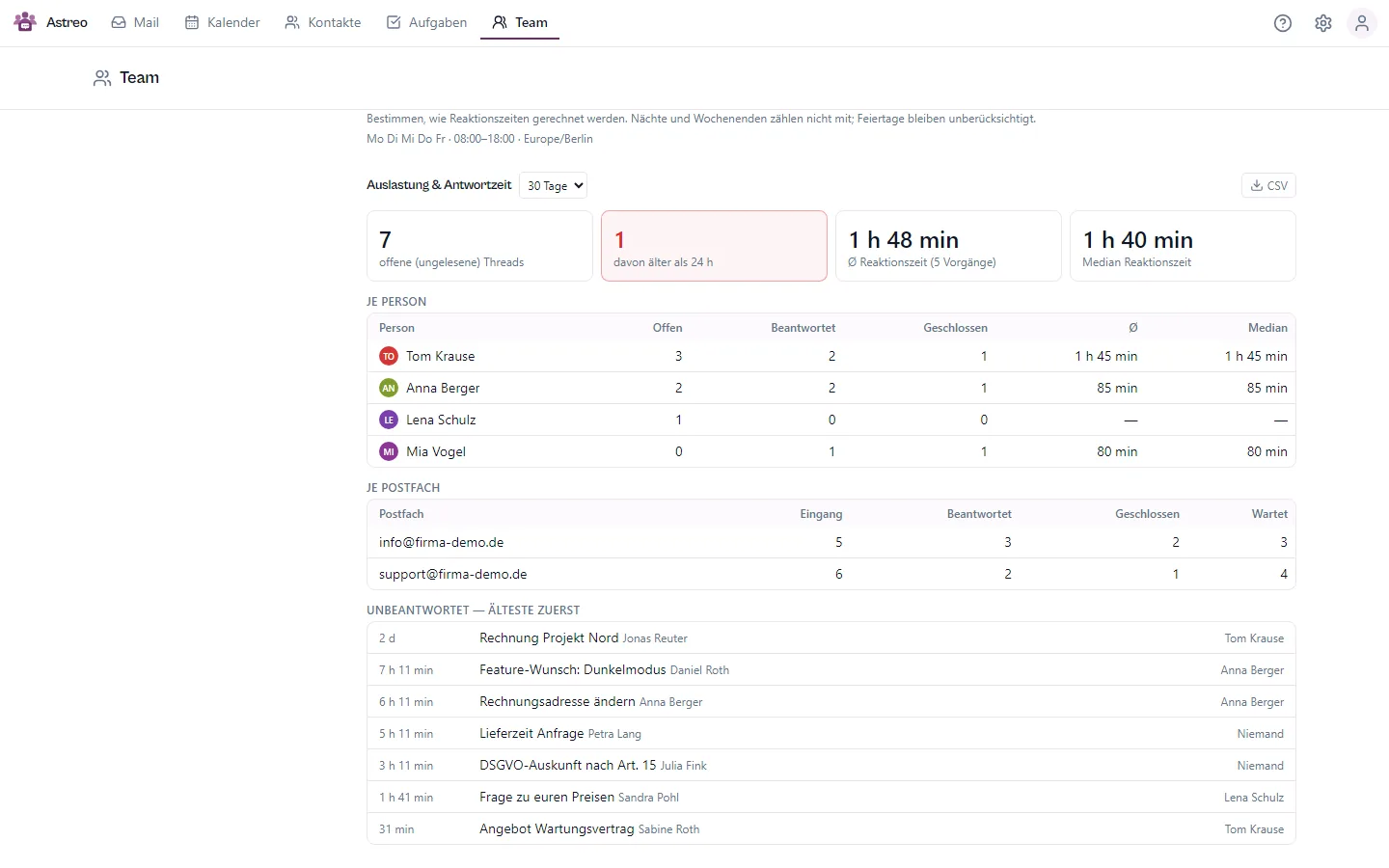
A selectable period, below it four figures and three tables:
- Open cases and, of those, older than 24 hours: the number that means someone has to act.
- Average and median response time. The median sits next to it because a single outlier makes the average useless.
- Per person: open, answered, closed, average and median.
- Per mailbox: received, answered, closed, waiting.
- Unanswered, oldest first: not a number but the answer to "who has not replied". One click takes you to the case.
Everything can be downloaded as CSV.
Escalation: when nobody is looking
You have to go to the reporting. Escalation reports on its own. Every five minutes it checks what has been waiting too long and moves up in levels. The deadlines count in business hours:
- Level 1: visible only. The card in the kanban gets a gray bar, and the case appears in the "Escalated" view.
- Level 2: a task with a due date is created for the owner. Yellow bar.
- Level 3: additionally, a mail to the team lead. Red bar.
The ladder starts with something that stays put rather than with a mail: reporting an overlooked mail by mail uses exactly the channel that just failed.
Deadlines can be set per mailbox, since support@ deserves different ones than
info@. Escalation is off by default: a feature that creates tasks on its own is
something you switch on, not something that ambushes you. When you switch it on, Astreo sets a cut-off date so the
entire backlog does not escalate at once.
The morning mail
Once a day, at the hour you choose, a short mail to the team lead. By default it is off, like
escalation: whatever sends mail on its own is something you switch on. And you choose per mailbox
what counts: support@ deserves a morning report, a catch-all mailbox perhaps not. If everything is
deselected, no mail is sent. The key number is left lying around: yesterday's incoming mail that
is neither answered nor closed nor assigned. It is in the subject line, so the mail answers its
question without being opened.
If nothing was left lying around, no mail is sent. A mail that arrives every day gets filtered away and is worthless on the day it matters.
What deliberately is not in it: a ranking per person. The numbers in this area show the state of the work, not the quality of the work.