Tasks
What a reply does not settle: tasks on a case, in your own list and from @mentions.
Not every mail is settled with a reply. "Call back on Monday", "work out a quote", "request the documents" — these are tasks, and until now they got lost on sticky notes and in people's memory. Astreo keeps them on the case, where they came from.
Creating a task from a mail
Open the History of the case – with the button at the far right of the action row, or with "Tasks" in the chat line, which opens History already filtered to the tasks. At the bottom of the window is the field for a new task:
- If you leave it empty, Astreo uses the subject as the title — exactly right in most cases.
- The first line becomes the title, everything after it the note. Enter creates the task, Shift+Enter starts a new line.
The task stays linked to the case: it appears in its place in History, and from the task list one click on the title takes you back to the mail. The mail view then jumps to the mail's mailbox and folder and highlights it in the list.
The Tasks area
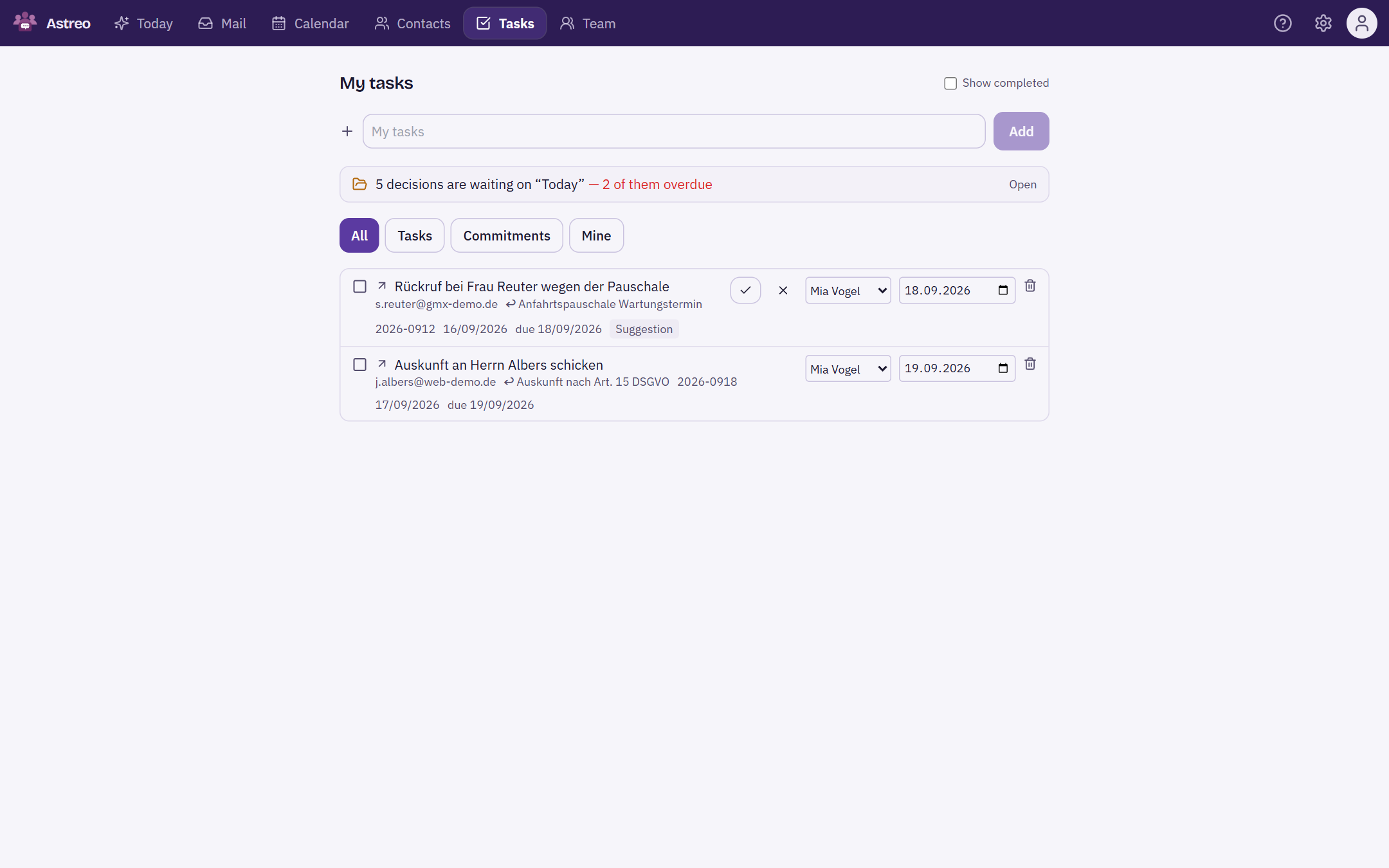
The top bar has its own area for all tasks — with and without a case. Not every task comes from a mail; at the top you can also create standalone tasks.
- Open tasks first, sorted by due date; overdue ones are highlighted.
- For each task you choose the assignee and the due date. That's how you hand a task to someone – to yourself, to people in your teams or to the people on the case's mailbox.
- The filters at the top: All, Tasks, Commitments and Mine (only what belongs to you).
- "Show completed" brings ticked-off tasks back into the list — a completed task is a record, not clutter.
Commitments
With Astreo Clear you also find commitments here: things promised in a mail – by you ("We'll get back to you by Friday") or by the other side ("The documents will follow next week"). Clear recognises them and creates them as suggestions; you confirm them or dismiss them with "Not a commitment". How commitments arise and fall due is described in Commitments, ownership & cover.
If cases are waiting for a decision on the Today page, the area shows a notice at the top such as "3 decisions are waiting on “Today” — 1 of them overdue". A click on it opens Today; these cases are handled there, not in the task list.
Mentions in the chat
In the internal chat, @name creates a mention. When you type @, Astreo suggests the people
on the mailbox; Enter picks the name from the list. The mentioned person gets the message assigned as a task — so the
most common kind of question in a team ("@anna can you take this?") becomes something that can't get lost.
If the case isn't assigned to anyone yet, the mention also assigns it to the first person named. It doesn't change an existing assignment. Mentioning yourself creates nothing.
Tasks that create themselves
If a case sits for too long, escalation creates a task by itself from level 2 onwards — for the owner, with a due date. Such tasks have no author from the team; they come from the automation. Completing them also completes the case behind them.
What tasks deliberately are not
No subtasks, no recurrence, no projects, no dependencies. Those are the features task managers drown in — and nobody asked for them. Astreo wants to prevent things from being forgotten, not replace Jira.